Free project management templates: open online or download Excel

Ready-to-edit plans with tasks, owners and dates. No account. The Excel files import back into the planner.

Updated September 28, 2026 · Free to use, no account needed

We may earn a commission if you sign up through our links, at no extra cost to you. It does not change what the free templates include.

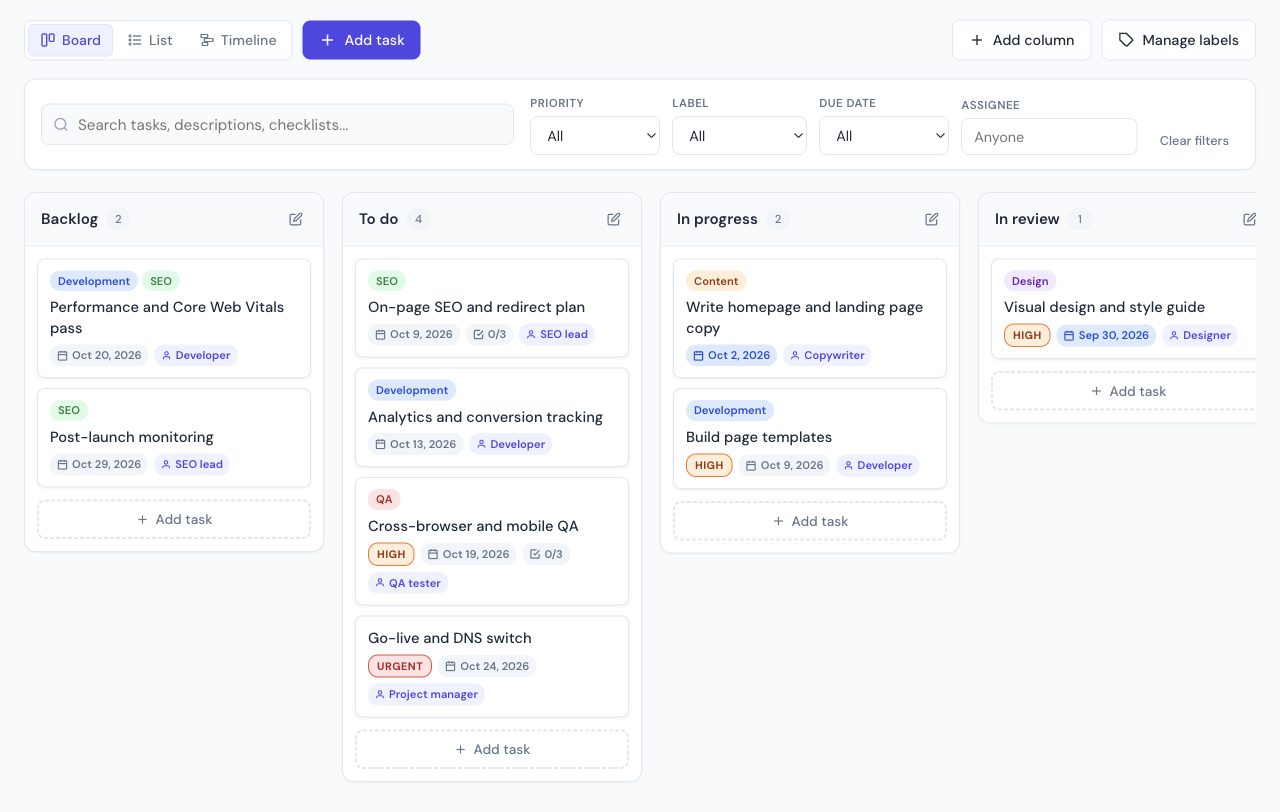
A website launch template open in the free planner, board view

Seven free project management templates: a website launch, a campaign, a sprint, an event, client onboarding, a renovation and a student group project. Open one in the browser, or download the same plan as Excel.

Website launch

Redesign or launch a website: discovery, design, build, QA and go-live.

12 tasks · about 6 weeks

See the tasks
  1. Kickoff meeting and project goals (Project manager, 1 day)
  2. Sitemap and page inventory (Project manager, 3 days)
  3. Wireframes for key pages (Designer, 5 days)
  4. Visual design and style guide (Designer, 6 days)
  5. Write homepage and landing page copy (Copywriter, 7 days)
  6. Build page templates (Developer, 10 days)
  7. On-page SEO and redirect plan (SEO lead, 4 days)
  8. Analytics and conversion tracking (Developer, 2 days)
  9. Cross-browser and mobile QA (QA tester, 5 days)
  10. Performance and Core Web Vitals pass (Developer, 3 days)
  11. Go-live and DNS switch (Project manager, 1 day)
  12. Post-launch monitoring (SEO lead, 5 days)
Marketing campaign

Run a multi-channel campaign from brief to results report.

10 tasks · about 5 weeks

See the tasks
  1. Campaign brief and target audience (Marketing lead, 2 days)
  2. Key message and offer (Marketing lead, 2 days)
  3. Landing page copy (Copywriter, 4 days)
  4. Creative assets (ads, banners, visuals) (Designer, 6 days)
  5. Email sequence (3 emails) (Copywriter, 4 days)
  6. Social media calendar (Social media manager, 3 days)
  7. Paid ads setup (Ads specialist, 3 days)
  8. Launch day (Marketing lead, 1 day)
  9. Mid-campaign optimization (Ads specialist, 2 days)
  10. Results report and learnings (Marketing lead, 2 days)

Product sprint (Scrum)

A two-week agile sprint with backlog, review and acceptance criteria.

10 tasks · 2 weeks

See the tasks
  1. Sprint planning (Product owner, 1 day)
  2. User login with magic link (Dev A, 5 days)
  3. Fix: export fails on Safari (Dev B, 3 days)
  4. Onboarding checklist UI (Designer, 6 days)
  5. Upgrade dependencies (Dev B, 2 days)
  6. Search results pagination (Dev A, 4 days)
  7. Fix: wrong time zone on due dates (Dev B, 2 days)
  8. QA regression pass (QA tester, 2 days)
  9. Sprint review and demo (Product owner, 1 day)
  10. Retrospective (Scrum master, 1 day)

Event planning

Organize a conference, workshop or company event, step by step.

10 tasks · about 8 weeks

See the tasks
  1. Define goals, budget and date (Event lead, 3 days)
  2. Book the venue (Event lead, 7 days)
  3. Confirm speakers (Program manager, 14 days)
  4. Catering and AV quotes (Logistics, 7 days)
  5. Registration page and tickets (Marketing, 4 days)
  6. Promotion plan (email and social) (Marketing, 25 days)
  7. Travel and accommodation for speakers (Logistics, 7 days)
  8. Run of show and staffing (Event lead, 5 days)
  9. Event day (Everyone, 1 day)
  10. Thank-you email and feedback survey (Marketing, 2 days)

Client onboarding

Onboard a new agency client: contract, kickoff, access and first wins.

8 tasks · 3 weeks

See the tasks
  1. Signed contract and first invoice (Account manager, 1 day)
  2. Welcome email and kickoff invite (Account manager, 1 day)
  3. Collect access (analytics, CMS, ad accounts) (Client, 5 days)
  4. Kickoff workshop (Strategist, 1 day)
  5. Audit and 90-day plan (Strategist, 7 days)
  6. Quick wins (first two weeks) (Specialist, 7 days)
  7. First monthly report (Account manager, 2 days)
  8. Check-in call (Account manager, 1 day)

Construction or renovation

Plan a renovation job: permits, trades, inspections and punch list.

11 tasks · about 8 weeks

See the tasks
  1. Plans and budget approved (Owner, 3 days)
  2. Building permit (Contractor, 5 days)
  3. Demolition and site prep (Contractor, 5 days)
  4. Framing and structural work (Contractor, 8 days)
  5. Rough-in electrical (Electrician, 4 days)
  6. Rough-in plumbing (Plumber, 4 days)
  7. Rough-in inspection (Inspector, 1 day)
  8. Drywall and insulation (Contractor, 6 days)
  9. Flooring, paint and fixtures (Contractor, 12 days)
  10. Final inspection (Inspector, 1 day)
  11. Punch list and handover (Contractor, 5 days)

Student group project

Split a school or university group project into tasks and deadlines.

9 tasks · 4 weeks

See the tasks
  1. Pick the topic and confirm with the teacher (Everyone, 2 days)
  2. Split roles and set deadlines (Everyone, 1 day)
  3. Literature research (Sam, 7 days)
  4. Survey and data collection (Lee, 8 days)
  5. Draft report sections (Everyone, 8 days)
  6. Edit and merge the report (Alex, 4 days)
  7. Presentation slides (Jordan, 4 days)
  8. Rehearsal (Everyone, 1 day)
  9. Submit the report and present (Everyone, 1 day)

There is also a blank board in the planner if none of these match. For a status-first layout, use the project tracker template.

How to use a template

  1. Open it in the free planner. Dates shift to start around today. Edit names, owners and columns.
  2. Or download the Excel file and edit it in Excel or Google Sheets (File, Import, Upload).
  3. To bring a spreadsheet into the planner, use Import. The first row must stay as the column titles.

The same planner is the no-signup option in our best free project management software comparison. ClickUp and monday.com are the step up when the plan has to live in a shared account.

The templates at a glance

Project management templates overview
TemplateTasksPlanned spanRoles
Website launch1242 daysProject manager, Designer, Copywriter, Developer, SEO lead, QA tester
Marketing campaign1035 daysMarketing lead, Copywriter, Designer, Social media manager, Ads specialist
Product sprint (Scrum)1014 daysProduct owner, Dev A, Dev B, Designer, QA tester, Scrum master
Event planning1062 daysEvent lead, Program manager, Logistics, Marketing
Client onboarding821 daysAccount manager, Client, Strategist, Specialist
Construction or renovation1151 daysOwner, Contractor, Electrician, Plumber, Inspector
Student group project928 daysSam, Lee, Alex, Jordan

Each template has at least one task already done or in progress, so you can see how status, priority and checklists look before you replace the example content. Checklist items inside tasks hold the small steps, which keeps each row one deliverable.

Adapt a template in ten minutes

  1. Write the end date first. Move the last task (go-live, event day, submission) to your real deadline, then pull the other dates back from it.
  2. Replace roles with names. The templates use roles such as "Designer" or "Account manager". One name per task; if a task has two owners, split it.
  3. Delete before you add. Remove the tasks that do not apply. A template with three irrelevant tasks gets ignored by the team.
  4. Keep one review point. Most templates include a check-in, QA pass, inspection or rehearsal. Keep it, even if you shorten everything else.
  5. Reset the statuses. Set everything that has not started to To do, so the board shows the real state on day one.
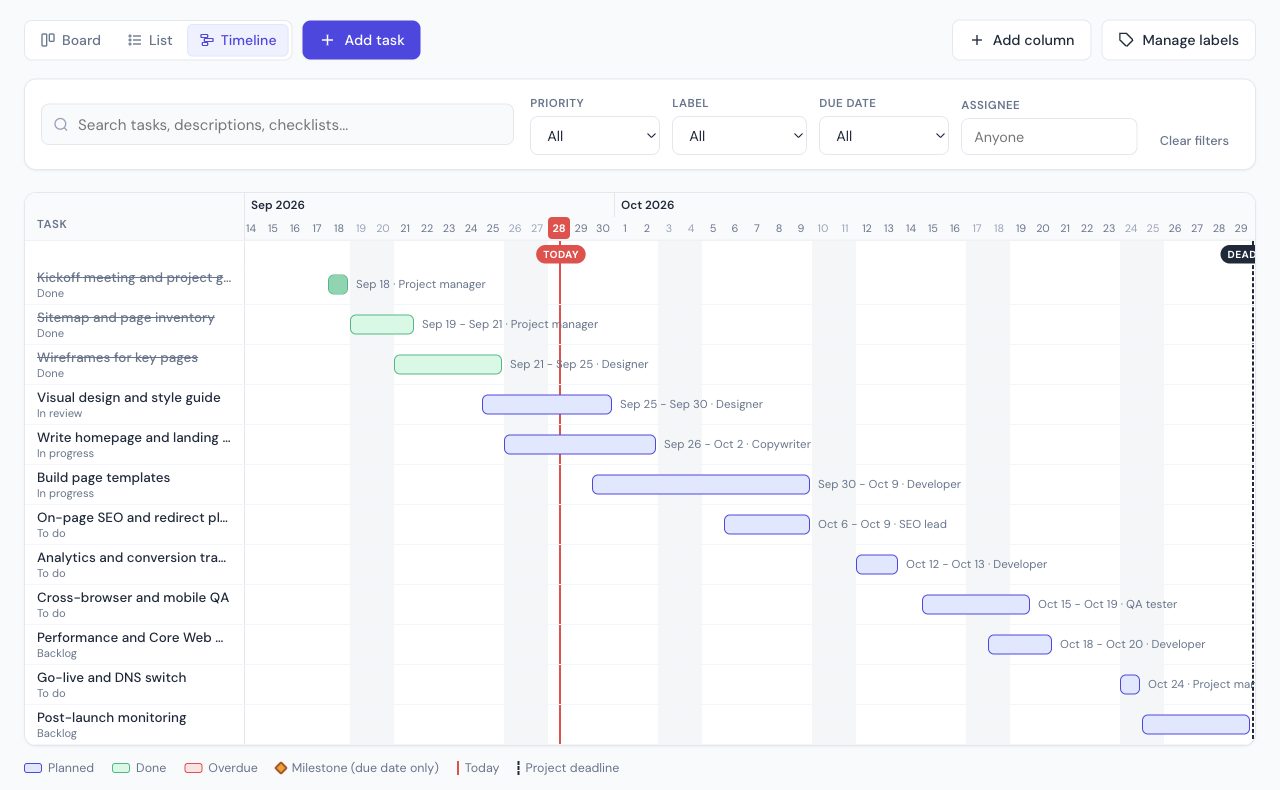
Timeline view of the website launch template in the free planner, with today's line and the project deadline
The same template in timeline view. Overlapping bars show where one person has too much in the same week.

What makes a project template useful

A useful template answers four questions without a meeting: what "done" looks like, who owns each step, when each step must finish, and where the plan gets checked. That is why every task here has an owner, a start date and a due date, and every template ends on a clear milestone. Labels group the work by discipline (Design, Content, Development), so you can filter the board by team.

What a template cannot know is your capacity. If the same person owns three tasks in the same week, move one. The timeline view in the planner makes those overlaps visible.

Templates inside ClickUp, monday.com, Asana and Trello

  • monday.com includes 200+ templates on its free plan, which is limited to 2 seats and 3 boards.
  • Asana lets teams build custom templates from the Starter plan ($10.99 per user billed yearly).
  • Trello has a gallery of community templates, and workspace-level templates on Premium.
  • ClickUp lets you save tasks, lists and docs as templates, and its free plan has no member cap.

The plans here work without any of them. If the team later moves into one of these tools, the Excel columns (title, status, priority, dates, owner) are the same fields you would set up there, so the structure carries over.

Related guides

Frequently asked questions

Are these project management templates free?

Yes. Opening one in the planner does not require an account. The Excel files are free to download. The planner keeps the project in your browser.

Do the dates update?

In the online planner, dates are set relative to today, so a template opened next month still has a sensible schedule. The Excel files use example dates starting September 28, 2026. Change those dates, or open the same template in the planner.

Can I import the Excel file back into the planner?

Yes. The files use Title, Status, Priority, Start date, Due date, Assigned to, Labels and Checklist items. On the planner, use Import and pick the file.

What if the team needs a shared template?

The planner is single-browser, with a share link if you want to hand the plan to someone else. For a template the whole team edits live, ClickUp's free plan includes unlimited members. monday.com includes 200+ templates on its free plan, limited to 2 seats.

Can I use these templates in Google Sheets?

Yes. Download the Excel file, then in Google Sheets use File, Import, Upload. The columns and example dates come across as plain text you can sort and filter.

Which template should I start with?

Pick the one closest to how the work ends: a launch date (website launch, event), a recurring cycle (product sprint), or a hand-off to someone else (client onboarding). Renaming tasks is faster than inventing the structure.